
When performing large deformation analyses in Abaqus, accurately representing the forces acting on the structure as it deforms is crucial. This is where the “Follow Nodal Rotation” option becomes essential (follower force). By enabling this feature, the applied loads rotate with the nodes, maintaining their alignment with the local coordinate system and providing a more accurate simulation of real-world conditions.
The “Follow Nodal Rotation” option allows the applied load to stay aligned with the node’s local coordinate system throughout the analysis, even if the node undergoes rotational displacements. This feature is particularly useful in scenarios involving large deformations and nonlinear material behaviors. However, it comes with limitations and considerations, such as compatibility with certain element types and potential impacts on stability and Abaqus convergence.
In this blog, we will delve into the details of the “Follow Nodal Rotation” option, explaining when to use follower forces and the importance of this feature in simulations involving large deformations. We will discuss the limitations and considerations to keep in mind and provide a step-by-step guide on how to activate this option in Abaqus. By the end of this blog, you will have a comprehensive understanding of how to use follower loads effectively in your analyses.

What is “Follow nodal rotation” option in Abaqus? | Follower force, Follower load
Abaqus 中的“跟随节点旋转”选项是指集中载荷(集中力)定义中的一个设置,它允许施加的载荷随关联节点旋转。启用此选项后,即使节点发生旋转位移,载荷也会在整个分析过程中始终与节点的局部坐标系保持一致。此选项在需要将施加的载荷与结构的旋转行为耦合的场景中尤为有用。它能够更准确地表示实际的载荷情况,因为载荷的方向可能会随着结构的变形而改变。.
为了更好地说明这一点,我们来看一个例子(见图 1)。假设一根悬臂梁,一端固定,另一端承受集中载荷。如果禁用“跟随节点旋转”选项,载荷将保持固定,不会随梁的挠曲而旋转。但是,如果启用该选项,载荷将随梁一起旋转,并始终与节点的局部坐标系保持对齐(见图 1)。.
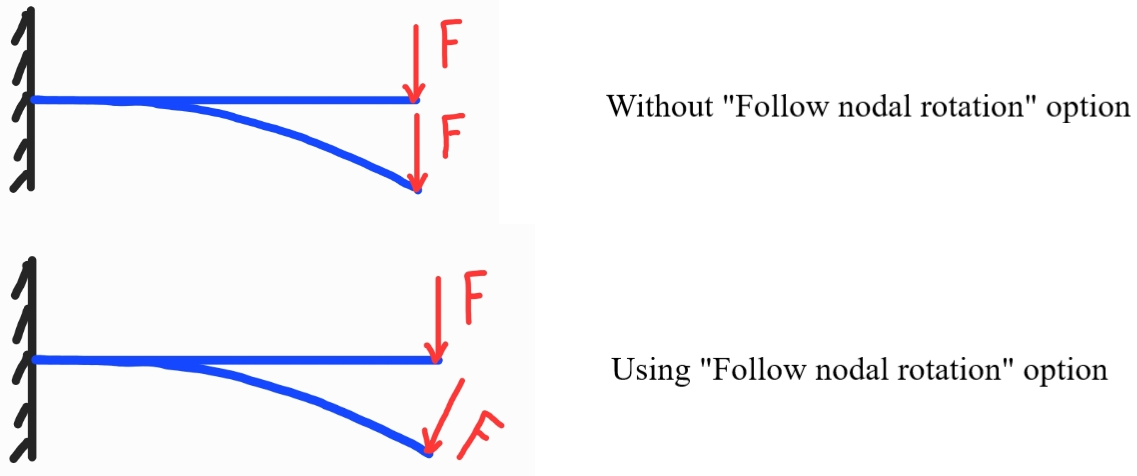
图 1:从动件受力,从动件节点旋转
When we should use follower force?
在大变形分析中,结构的形状和构型会在整个模拟过程中发生显著变化。随着结构变形,初始构型下施加的节点力可能无法准确反映变形后结构上的实际受力情况,从而导致结果出现误差。.
启用“跟随节点力”选项(跟随载荷、跟随力)后,Abaqus 会在分析过程中自动更新节点力,以适应几何形状和变形的变化。这确保了施加的力能够准确反映结构的当前状态,并考虑到大的变形和非线性行为。.
启用此选项对于涉及非线性材料(例如塑性或超弹性材料)的模拟尤为重要,因为这些材料的变形响应高度依赖于所施加的力。通过跟踪节点力,分析可以捕捉到正确的力-位移关系,并提供更精确的结果。.
值得注意的是,“跟随节点力”选项可能会增加计算成本,因为每一步都需要重新计算力。因此,应根据分析的具体要求和所需的精度水平谨慎使用此选项。.
“Follow nodal rotation” limitations and considerations
在 Abaqus 中使用“跟随节点旋转”选项(跟随载荷、跟随力)时,需要注意一些限制和注意事项:
- 兼容性:此选项仅适用于支持旋转自由度的特定单元类型。并非 Abaqus 中的所有单元类型都支持节点旋转,因此务必确保所选单元与此选项兼容。.
- 荷载施加方式:“跟随节点旋转”选项通常适用于作用于单个节点的集中荷载。对于分布荷载或作用于某个区域的荷载,该选项可能不适用或意义不大。.
- 载荷方向:启用“跟随节点旋转”选项后,载荷方向将相对于节点的局部坐标系保持固定。在某些情况下,载荷需要相对于全局坐标系或其他参考系保持固定方向,此时可能不希望出现这种情况。.
- 稳定性:“跟随节点旋转”选项可能会增加分析的复杂性,并可能影响解的稳定性和收敛性。因此,监控收敛情况并进行适当的检查以确保结果的准确性和可靠性至关重要。.
How to use the “Follow nodal rotation” in Abaqus? | Abaqus Follower Load
在 ABAQUS 中进行大位移分析或有限滑动分析时,需要使用随动载荷来改变作用于节点上的力(随动力)的方向。随动载荷允许力随其作用的节点旋转,并随着节点的旋转而改变力的方向。当使用集中力或力矩时,可以通过选择“随节点旋转”选项(参见图 2)来激活 Abaqus 随动载荷。.
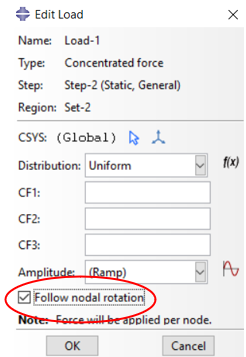 图 2:选择“跟随节点旋转”选项
请注意,使用从动载荷时,刚度矩阵将变为不对称矩阵,因此必须使用非对称矩阵存储。您可以在图形界面或输入文件中进行设置(参见图 3 和图 4)。.
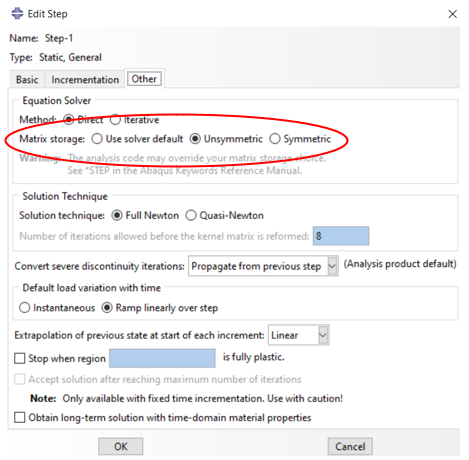 图 3:通过图形界面选择非对称矩阵
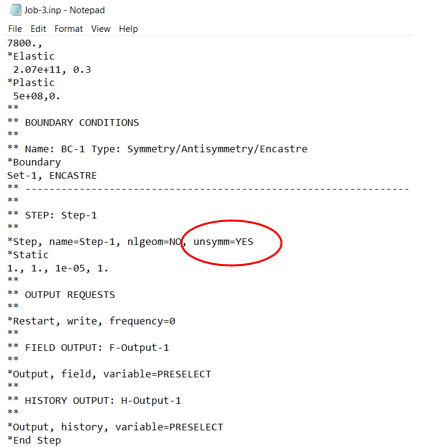 图 4:通过输入文件使用非对称矩阵
Speaking of rotation, I’m sure by now you have realized that by rotation in the “follow nodal rotation” phrase we don’t mean actual rotation; however, we have an article about rotation in Abaqus titled: 什么是 Abaqus 负载扭矩(力矩)?如何在 Abaqus 中应用它?
This article discusses the “Follow Nodal Rotation” option in Abaqus, a setting crucial for accurately representing forces in large deformation analyses (follower force). This feature ensures that applied loads rotate with nodes, aligning with their local coordinate system and thus providing a realistic simulation of structural behavior under deformation. The importance of this option lies in its ability to maintain the correct force alignment, crucial in simulations with nonlinear material behaviors like plasticity or hyperelasticity.
文章涵盖了以下几个要点:
- 定义和重要性: Explains the “Follow Nodal Rotation” option and its role in keeping applied loads aligned with nodal rotations, enhancing the accuracy of real-world simulations.
- 使用场景:强调了在大变形分析中考虑从动力的必要性,以确保力的准确表示,特别是对于非线性材料。.
- 局限性和注意事项:讨论了兼容性问题、合适的负载应用和潜在的稳定性影响,强调了谨慎实施的必要性。.
- 激活指南:提供了在 Abaqus 中启用此选项的分步指南,并指出使用非对称刚度矩阵以获得准确结果的重要性。.
In conclusion, this article provides a comprehensive overview of the “Follow Nodal Rotation” option in Abaqus, detailing its importance, proper usage, and limitations. Understanding and effectively implementing this feature can significantly improve the accuracy of simulations involving large deformations and nonlinear material behaviors.
浏览我们内容全面的 Abaqus 教程页面,其中包含免费的 PDF 指南和适合所有技能水平的详细视频。探索免费和付费套餐,以及高效掌握 Abaqus 的必备信息。立即开启您的 Abaqus 学习之旅! Abaqus教程 现在!
阅读更多: 如何在Abaqus中处理大旋转?






 English
  Korean
  Chinese