
If Abaqus is a high-end calculator, an Abaqus subroutine is a custom formula you program into it. The calculator does the heavy math, but you provide the unique logic to solve your specific problem.
The Abaqus user subroutine allows customizing the program for specific applications that aren’t available through the main Abaqus features. You should write a subroutine if you can’t run your analysis using ABAQUS’ built-in models for materials, loads, properties, elements, etc.
In this article, we, the CAE Assistant, provided a roadmap for writing user subroutines with Abaqus. Follow this article to become familiar with Abaqus subroutine examples and the best Abaqus subroutine tutorials. Writing user subroutines with Abaqus will be easier after reading this post.

1. Requirements for Writing Abaqus Subroutines
Abaqus user subroutines are primarily written in Fortran, and for the software to execute this code, it must communicate seamlessly with a C++ environment and a Fortran compiler. Before you can begin coding your first material model or complex load, you must establish what we call a “three-way handshake” between your software components.
(Simulation)
(Linker)
(Compiler)
- MS Visual Studio 2022
- Intel® oneAPI Base & HPC Toolkit 2022
- "ifort.exe not found in PATH"
- "Visual Studio is not found in the system"
- "Problem during linking"
Run these commands in CMD and look for PASS:
abaqus verify -user_std
abaqus verify -user_exp
2. What exactly is an Abaqus subroutine?
An Abaqus subroutine is a user-written Fortran code that allows you to add custom physics or mathematical models to your simulation. Essentially, it serves as a bridge between the solver and your unique engineering requirements. Therefore, you can use these routines when standard software features cannot capture complex material behaviors, boundary conditions, or loading scenarios.
3. Which Abaqus Subroutine Should I Use?
Selecting the correct Abaqus subroutine depends primarily on your “Engineering Need” and the specific solver you are using (Standard vs. Explicit).
Abaqus provides a vast array of subroutines, each offering specific advantages for different types of analysis. However, they also have limitations regarding coding complexity and the required level of mathematical expertise.
The following table categorizes the most essential Abaqus subroutines by what they solve to help you identify the best tool for your research.
| Category | Standard / Explicit | Primary Use & Practical Case | Learn More |
|---|---|---|---|
| Materials | UMAT / VUMAT | Defining custom mechanical constitutive behavior. Case: Strength prediction of 3D braided composites or FGM behavior. | Free Blog & Tutorial |
| Loading | DLOAD / VDLOAD | Defining nonuniform distributed mechanical loads. Case: Simulating dynamic moving loads on asphalt concrete pavements. | Free Blog & Tutorial |
| Field Variables | USDFLD / VUSDFLD | Redefining field variables at material points. Case: Phase change simulation from powder to solid in 3D printing. | Full Tutorial |
| Boundary Conditions | DISP / VDISP | Prescribing translational and rotational motions. Case: Calculating stress intensity factors at crack wakes. | Full Tutorial |
| Thermal | DFLUX / VDFLUX | Applying nonuniform distributed heat or mass flux. Case: Thermal stress prediction in laser cutting. | Free Blog & Tutorial |
| Heat Generation | HETVAL / VHETVAL | Defining internal heat generation models. Case: Phase changes during WAAM. | Full Tutorial |
| Hyperelasticity | UHYPER | Defining strain energy potential for isotropic hyperelasticity. Case: Deformation in temperature-sensitive hydrogels. | Full Tutorial |
| Elements | UEL / VUEL | Creating user-defined finite elements. Case: Phase-field modeling for brittle fracture. | Free Blog & Tutorial |
| Interactions | FRIC / VFRIC | Modeling complex frictional contact. Case: Multi-layered metallic configurations. | Full Tutorial |
| Viscoplasticity | CREEP | Defining time-dependent deformation. Case: Viscoplastic behavior in polymers. | Free Blog & Tutorial |
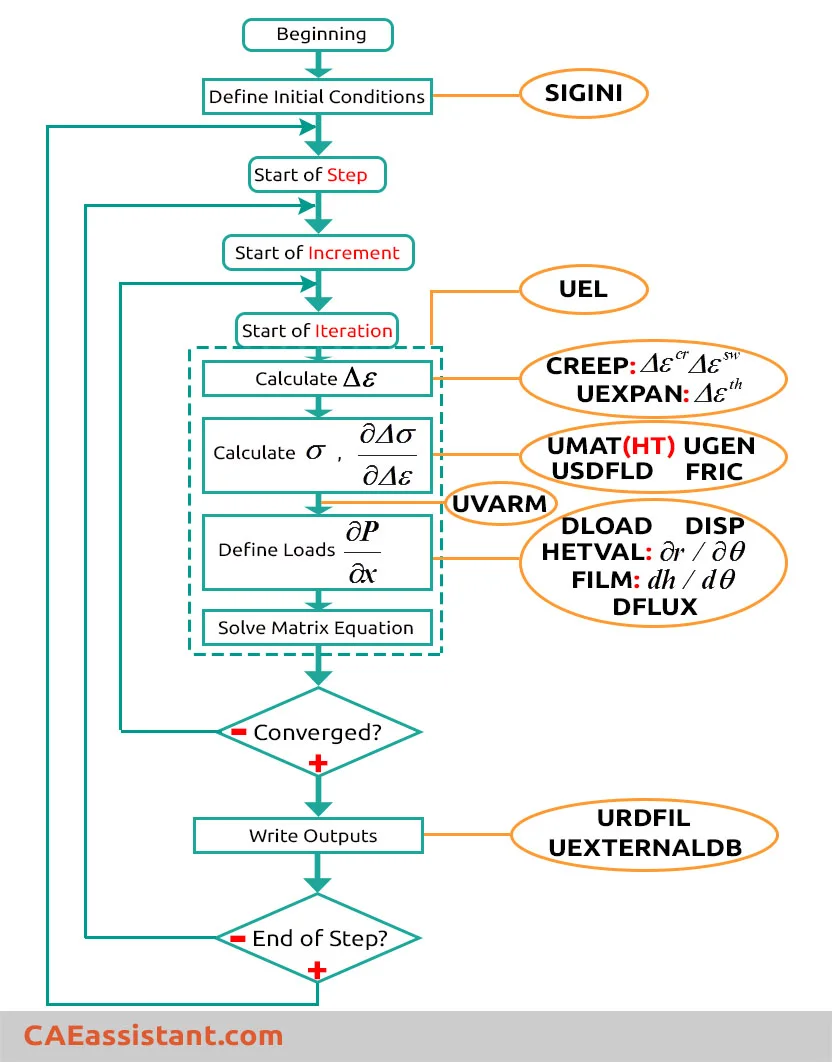
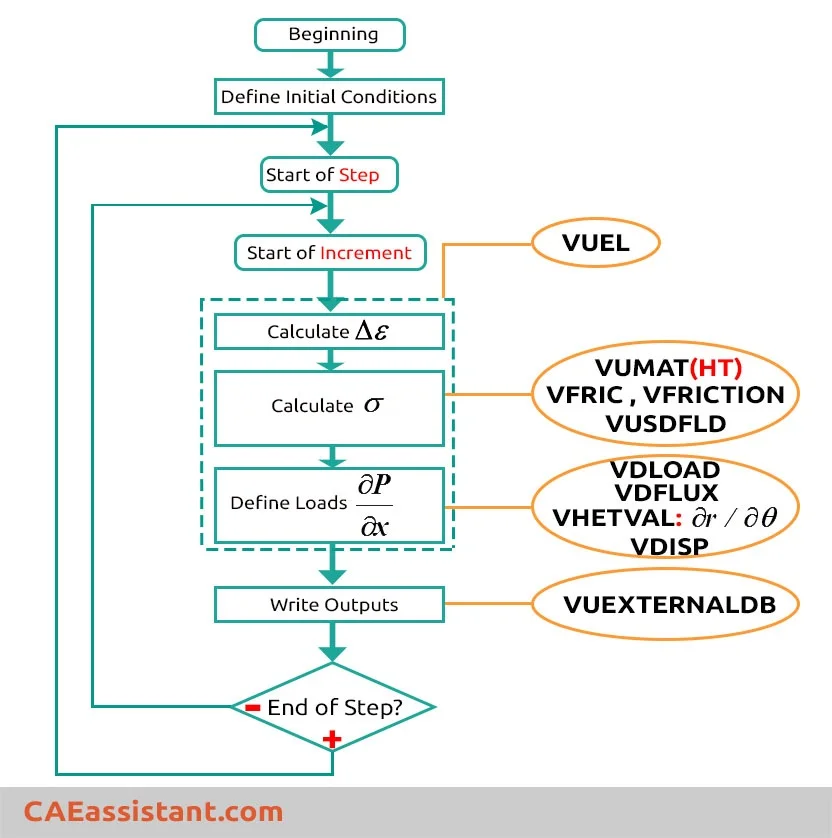
This is where you should decide which subroutine is the answer to your need. While a complete understanding of the structure of Abaqus is not required to develop a user subroutine, it helps if the developer has at least an overview of the structure. This understanding is really mandatory when writing advanced subroutines like UMAT or UEL.
This is the basic flow of data and actions from the start of an Abaqus/Standard analysis to the end:
And this is the basic flow diagram in an Abaqus/Explicit analysis:
There is some Abaqus subroutine example or Abaqus user subroutine manual in our Subroutine category.
4. How to write Abaqus subroutines?
To write an Abaqus subroutine, you must create a standard text file with a .for or .f extension and populate it with Fortran code that follows the specific interface structure defined in the Abaqus documentation.
This file acts as your custom “recipe” that the Abaqus solver executes during the simulation.
Now let’s go step by step together to see how to do it:
First, when you open the Abaqus documentation, scroll down until you reach the User Subroutines section, which is highlighted in the figure. As you can see in the figure, the subroutines are categorized based on the solvers.

Next, select the subroutine you need. Here, as shown in the figure, DISP has been selected as an example. The first part shown in the figure provides an explanation of what the subroutine is and what it is used for. Read this section carefully to make sure the subroutine is suitable for your application and to fully understand the required information before working with it.

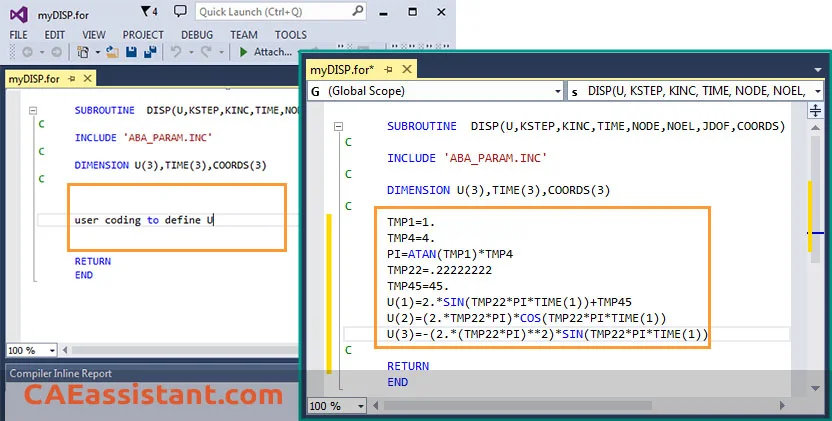
The next part, shown in the following figure, is the interface of the subroutine. You directly copy and paste this into the text file we mentioned earlier.

4.1. Do I Need to Be a Programmer to Write Subroutines?
You must have a foundational understanding of Fortran because it is the native language for both Abaqus/Standard and Abaqus/Explicit solvers. While you don’t need to be a computer scientist, you must understand the “alphabet” of Fortran—such as loops, conditional statements, and array operations—to communicate with the solver. However, you should not reinvent the wheel here.
To avoid repeating basic coding lessons, we have prepared a dedicated guide that covers everything from column rules to built-in functions.
Master the Abaqus Fortran Syntax
Before writing your code, master the specific syntax and rules required for subroutines. Learn everything from column positions and data types to matrix operations in our dedicated guide.
Master Fortran Essentials →5. How to Use a Written Subroutine in Abaqus?
After you have written your own Abaqus user subroutine, you need to inform Abaqus where to use the subroutine. It depends on the type of subroutine. For example, DISP is a type of B.C. So, we go to Load module:
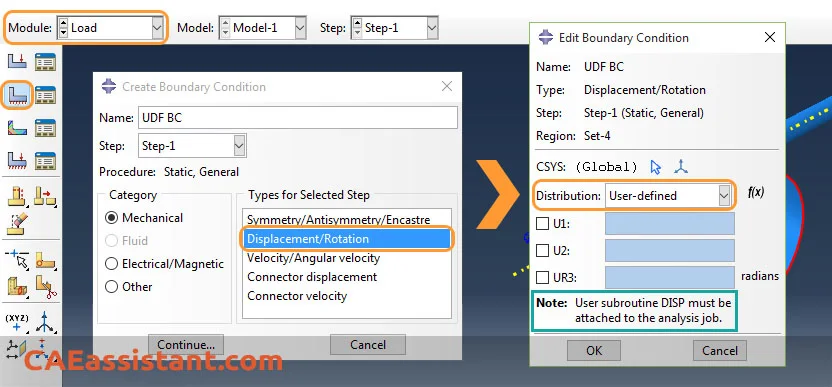
And when creating a new job, you give the address of your written subroutine.

6. How can I use multiple user subroutines in Abaqus? Should each subroutine have a separate file or be placed in the same .for file? How?
In Abaqus, there are situations where it becomes necessary to write multiple subroutines within a single file. This approach offers several advantages, including improved code organization, efficient compilation, and simplified code management. By combining multiple subroutines into a single file, engineers can better organize their code and maintain a logical structure. This helps in understanding the relationships and dependencies between different subroutines, making it easier to navigate and modify the code when necessary.
Additionally, compiling a single file with multiple subroutines can be more efficient than compiling multiple individual files. It reduces the overhead associated with compiling and linking separate files, resulting in faster compilation times.
Furthermore, managing a single file is often more convenient than dealing with multiple files. It simplifies the process of version control, sharing code with collaborators, and ensuring all necessary subroutines are readily available.
An example of multiple subroutines within a single file could be a scenario where an Abaqus user wants to implement custom material behavior along with user-defined elements. They might write a subroutine for the constitutive model (e.g., UMAT) and another subroutine for the user-defined element behavior (e.g., UEL). By combining these subroutines into a single file, the engineer can maintain a cohesive representation of their custom material and element behavior, making it easier to manage and reuse the code in different analyses.
We can have more than one Abaqus subroutine in one file. Abaqus himself will call both subroutines wherever and whenever it needs during analysis.
For example, if you are writing a UMAT and a USDFLD, your Fortran file will have such a structure:
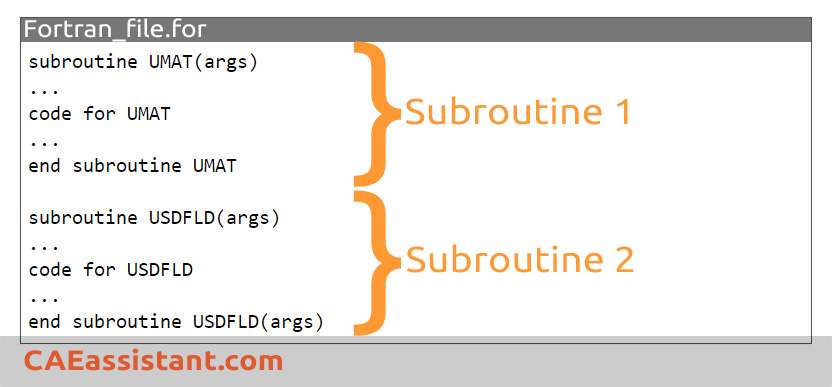
Remember that a given user subroutine (such as UMAT or USDFLD) should appear only once in the specified user subroutine source.
7. Can I Automate Abaqus Subroutines with Python Scripts?
Yes, you can use Python to automate model creation and job submission while your Fortran subroutine handles the complex physics.
This “Hybrid Workflow” gives you a massive competitive edge. In this setup, Python acts as the manager. It automates repetitive tasks like creating geometry, building assemblies, and setting up boundary conditions. Meanwhile, your Abaqus subroutine (written in Fortran) acts as the specialist. It handles the advanced material laws or custom physical behaviors at the integration points.
Practical Workflow Cases
- Crack Propagation: A Python controller can manage sequential job restarts and automatically update boundary conditions based on data from the Fortran routine.
- Micromechanics: You can use Python to automate the placement of hundreds of fibers in a composite model, while a VUMAT routine handles the damage mechanics.
- Parametric Material Studies: Python can automatically adjust material constants in the input file that are then processed by a UMAT or UHARD subroutine.

You can run your scripts either directly through the Abaqus/CAE interface or via the system command line for faster processing.
Running from Abaqus/CAE is the easiest method for beginners because you can see the model update instantly in the graphical interface. However, for large models or batch processing, the GUI is often slow. Therefore, advanced users prefer the System Command Line (cmd). By using the command abaqus cae noGUI=script_name.py, you can run simulations much faster without wasting resources on visual feedback.
Master Abaqus Scripting from Zero
Stop wasting time on manual clicks. Learn how to automate model creation, run parametric studies, and perform ultra-fast post-processing using our full tutorial.
Read our FREE Blog and More →Here below, I have listed some main Abaqus subroutine tutorials that you may encounter when using Abaqus at an advanced level as a graduate student or researcher. Good news for you! You can learn each subroutine you want by clicking on that.
In the last part of this post, I invite you to watch the below video, which presents our main Abaqus tutorial package that can save a lot of time if you are a beginner in Abaqus.
References:
Abaqus Documentation (User Subroutine Reference Guide)
Abaqus Documentation (Analysis User’s Guide)
The CAE Assistant is committed to addressing all your CAE needs, and your feedback greatly assists us in achieving this goal. If you have any questions or encounter complications, please feel free to comment here.
What is a Abaqus subroutine?
The Abaqus user subroutine allows the program to be customized for particular applications unavailable through the main Abaqus facilities. You should write a user subroutine if you cannot run your analysis by ABAQUS built-in models for materials, loads, properties, elements, etc.
What is UMAT subroutine in ABAQUS?
The UMAT subroutine is used in Abaqus/Standard. If you need to model a user-defined nonlinear stress-strain relation, which is not provided by Abaqus, then look for the UMAT user subroutine. UMAT will allow you to define the customized material model for your problem.
What are the prerequisites to writing a subroutine in Abaqus?
Abaqus User subroutines are mostly written in Fortran. When a simulation model that contains user subroutines is submitted to Abaqus, the correct compile and link commands should be used automatically. If the version of your Fortran compiler does not correspond to that specified, incompatibilities may occur. Therefore, it is important to have compatible components for subroutine configuration. You can find a comprehensive guide to compatible versions of Abaqus, Intel Fortran and Visual Studio In this article: Compatible Fortran and Visual Studio for Abaqus
What kind of subroutines are there in Abaqus software?
There are different kinds of subroutines used in Abaqus. Each subroutine is useful for a certain part of the simulation. For example, User subroutines UMAT allows constitutive models to be added to the program. A more advanced subroutine is UEL, which allows the creation of user-defined elements. Also, different other subroutines are applicable in ABAQUS. Less complex Abaqus user subroutine examples are DLOAD, DISP, UVARM, URDFIL, etc. You can get familiar with the most important and typical subroutines by reading these articles: 10 Useful ABAQUS subroutines (Part 1), 10 Useful Abaqus Subroutine (Part 2).
How can I learn to create subroutines using Abaqus Documentation?
To learn about a certain subroutine, you need to find your subroutine name from Abaqus User Subroutines Reference Guide in Abaqus Documentation. Each subroutine guide contains seven sections. The first four sections are used to describe subroutine usage and ability in Abaqus, its limitations, etc. The final three sections provide the code structure used for this subroutine. Generally, the variables passed into a user subroutine via the argument list are classified as either variables to be defined, variables that can be defined, or variables passed in for information.




 English
  Korean
  Chinese
6 Responses
This article is awesome!
Continue to produce such articles!
i like this amazing post
Way cool! Some extremely valid points! I appreciate you penning this post plus the rest of the site is very good.
Wow! Thank you! I permanently wanted to write on my site something like that. Can I include a part of your post to my blog? Rafaelita Ettore Ailsa
You made a number of good points there. I did a search on the subject and found most persons will agree with your blog. Elspeth Kit Hobey
This article was one of the most complete articles I have ever read about subroutine. Thank you for preparing this article
If it is possible, can you suggest me training packages about writing subroutines?
thanks for your help