
很多人问过我们类似的问题: 什么是面向学生的免费Abaqus版本?? 哪个版本的Abaqus最适合他们的需求他们可以使用 Abaqus 学生版(Abaqus 学习版)运行模拟吗?? 如何下载并安装Abaqus? 你是否也曾有过同样的疑问?
我们知道购买 Abaqus 代币可能相当昂贵。但您是否知道,在很多情况下,您可以使用 Abaqus 学生版(学习版)完全免费运行仿真?而且对于许多类型的仿真,您可以使用更少的代币完成工作,从而显著降低成本。.
在本篇博客中,我们将探讨 Abaqus 学生版的功能和局限性,并提供 Abaqus 的直接下载链接。我们还将逐步指导您完成安装过程。此外,我们还将解释如何根据用户数量和 CPU 核心数来估算 Abaqus 商业版所需的令牌数量。.
为了方便起见,我们在本博客中提供了两个在线工具:
- 在 第一工具, 您可以输入 CPU 核心数、并发用户数和 Abaqus/CAE 席位数。系统将自动计算您需要购买的代币数量。.
- 在 第二工具, 只需输入您拥有的(或计划购买的)代币数量,它就会显示您可以在分析中使用多少个 CPU 核心。.
Introduction of Abaqus software editions | Abaqus download
Abaqus is a powerful engineering simulation software suite based on the finite element method that can solve problems ranging from simple linear analyses to the most difficult nonlinear simulations. Abaqus has a large library of elements that can model almost any geometry. It also has a long list of material models that can simulate the behavior of most common engineering materials; for example, metals, rubber, polymers, composites, reinforced concrete, crushable and resilient foams, and geotechnical materials like soils and rock. Abaqus is a general-purpose simulation tool that can be used to study problems other than structural (stress/displacement). It can simulate heat transfer, mass diffusion, thermal management of electrical components (coupled thermal-electrical analyses), acoustics, soil mechanics (coupled pore fluid-stress analyses), and piezoelectric analysis, among other things.
如今,工程团队经常使用来自不同供应商的专业仿真工具进行产品仿真,以模拟各种设计属性。使用多个软件供应商会导致效率低下并增加成本。SIMULIA 提供了一套可扩展的统一分析产品,使所有用户,无论其仿真专业知识或领域背景如何,都能协作并共享仿真数据和已批准的方法,而不会降低信息的准确性。.
Abaqus 有两种版本:Abaqus 学生版 (SE) 和 Abaqus 商业版。.
- Abaqus学生版
任何对 Abaqus 感兴趣的人都可以免费下载 Abaqus 学生版(Abaqus 学习版)。您可以使用该软件的教育版和研究版在个人电脑上进行有限元分析,但其存在一些限制,例如 1000/10000 个单元节点,并且受个人使用许可协议的约束。完整的 HTML 格式文档使其成为理想的 Abaqus 学习工具。.
We’ve got you covered with all the information you need about the Abaqus student version in Section 2. Stick around for the full scoop!
- Abaqus商业版
Abaqus 商业版能够为常见和复杂的工程问题提供强大而完整的解决方案。由于目前使用的是单用户评估演示许可证,因此该软件不对公众开放。如果您的团队想要使用 Abaqus 商业版,则需要购买学术许可证。(顺便一提,考虑到该软件包的功能,其价格非常合理。)[learn_press_recent_courses]
Abaqus Student Edition | Abaqus for student
Abaqus 学生版、Abaqus 学习版、Abaqus 学生版和 Abaqus 免费版都是用户对这个特定版本的称呼。因此,如果您听到这些名称中的任何一个,它们都指的是同一个版本。.
达索系统为学生提供免费版的Abaqus软件。该版本专为满足学生的需求而设计。.
ABAQUS 学生版是一款个人有限元分析工具,用于处理规模有限的问题(ABAQUS/Standard 和 ABAQUS/Explicit 最多支持 1000 个节点,ABAQUS/CFD 最多支持 10,000 个节点)。它采用个人使用许可,可安装在笔记本电脑和家用电脑上,并可永久使用。ABAQUS 学习版包含完整的在线 ABAQUS 文档集,并兼容 Windows XP/Vista/Windows 7、8、10、11 以及 Linux 系统。ABAQUS 学生版与 ABAQUS 教学版和 ABAQUS 研究版完全兼容,是您校园 ABAQUS 系统的理想补充。.
ABAQUS 学生版包含 ABAQUS/Standard、ABAQUS/Explicit、ABAQUS/CFD 和 ABAQUS/CAE 等所有版本。模型数据库与其他获得学术许可的 ABAQUS 版本兼容,使学生能够对使用 ABAQUS 学生版创建的模型进行日益复杂的分析。完整的 HTML 文档使 ABAQUS 学生版成为一个全面且可搜索的资源,方便用户查找详细信息。.
结构分析和后处理的最大模型规模为:个人学习模型1000个节点,流体分析模型10000个节点。不支持需要编译器(用户子程序、ABAQUS Make、C ODB API)、并行执行或附加产品的功能。ABAQUS/CAE不支持回放或日志文件。.
正如我们之前提到的,您可能在各种渠道见过学习版;它与学生版相同,只是名称不同。任何对学习 ABAQUS 感兴趣的人都可以免费下载 ABAQUS 学习版。ABAQUS 学习版仅适用于 Windows 系统,支持最多 1000 个节点的结构模型。ABAQUS 是一款价格昂贵的软件。如果您在学术机构工作,您的部门可能已经订阅了研究版。工程技术服务部门目前以按需付费的方式提供 Abaqus 研究版。Abaqus 研究版包含 Abaqus/Standard、Abaqus/Explicit 和 Abaqus/CAE。由于同时包含 Abaqus/Standard 和 Abaqus/Explicit,用户可以根据仿真类型选择最佳分析技术,甚至可以将两种技术结合起来使用。在研究版中,用户自定义子程序使高级研究材料、复杂表面和接触行为以及其他用户特定功能的建模变得更加容易。.
您可以从以下链接免费下载 Abaqus 学生版:
https://edu.3ds.com/en/software/abaqus-learning-edition
If you work for a company, they will need to purchase licenses for the Commercial edition if they do not already have any. The good news is that if all you want to do is learn how to use the software, you can do so for free by downloading ABAQUS Student Edition (SE) or Abaqus learning edition. Abaqus download
虽然 ABAQUS SE 之前仅供学生使用,但现在任何人都可以出于教育目的下载使用。下载包中还包含 ABAQUS 文档。以下内容将介绍 Abaqus 的付费版和商业版、安装 Abaqus 的最低系统要求、相关软件下载链接以及 Abaqus SE 版本的安装步骤。稍作休息,稍后再来。.
Suppose you’ve downloaded the Abaqus learning edition and are ready to learn Abaqus; But, do you know where to start? I recommend searching on YouTube or checking these tutorial packages available on CAE助理.

Abaqus商业版
As mentioned in the introduction, this version of Abaqus requires payment, and you have to pay different prices according to different analyses. It provides a powerful and comprehensive solution for routine and complex engineering problems, as well as a good collection of Multiphysics and structural-pore capabilities capturing simulation software. If you work for a company, you will need to purchase licenses for the Commercial edition. You can contact Dassault Systems directly if your company has earnings of more than $2 billion or more than 5,000 employees. Otherwise, a local reseller can help. Abaqus download
Abaqus 的价格是多少?
Dassault Systèmes, Abaqus’ parent company, offers a number of promotional pricing packages throughout the year, but here is an overview of the starting prices for different packages (as of April 2022):
- A quarterly lease of ABAQUS begins at around $7,000
- A year’s lease on ABAQUS begins at around $19,000
- The cost of purchasing ABAQUS starts around 31,000,withannualmaintenance(updatesandsupport)startingat6,000 per year.
What are Abaqus tokens?
One of FEA products, Abaqus, is frequently used for simulations in CAE (computer-aided engineering). Dassault purchased Abaqus in 2005, and there are two license managers available: Dassault’s own DSLS product and Flexera’s Flexnet, which is made to manage token licenses. Due to the nature of FEA software, which frequently runs on multiple processors with no or minimal user intervention, the token system performs impressively for Abaqus. The following factors determine how many tokens are needed for a job:
- 同时在线用户数
- 所需的并行处理器(CPU 或 GPU)数量
- 根据用户数量,CAE 预处理器至少需要 1 个令牌
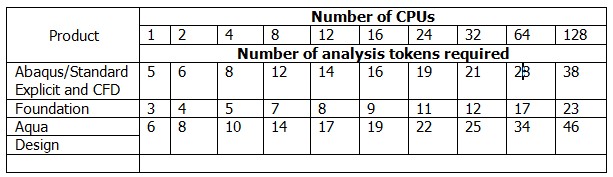
Abaqus 采用令牌授权。令牌可用于访问标准求解器和显式求解器。除了计算机硬件的限制外,这些求解器没有单元或节点数量限制。对于大型且耗时的有限元分析模型,多 CPU 或 CPU 核心通常可以提高计算吞吐量。在单个 CPU 核心上运行模型至少需要 5 个分析令牌。表 1 和表 2 显示了各种 Abaqus 产品的令牌成本。.
表1:根据分析次数计算所需的令牌数量
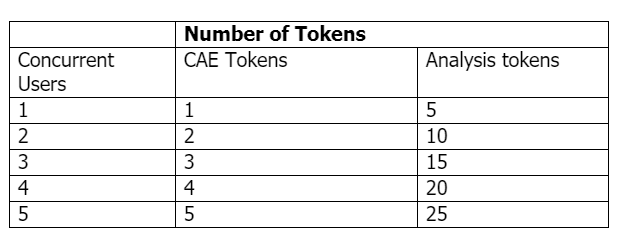
表2:根据CPU数量计算所需令牌数量
使用下面的在线工具,您可以输入 CPU 数量、活跃的 Abaqus/CAE 席位和并发用户数,它将自动显示所需的令牌数量。.
如果您想知道根据您拥有的令牌数量,可用于并行处理的 CPU 核心数是多少,只需在下方工具中输入令牌数量、激活的 Abaqus 席位数量和用户数量即可。该工具将自动计算并显示您可用的 CPU 核心数。.
安装 Abaqus 的最低要求
在开始安装之前,请确保您的系统满足以下要求:
- 您的操作系统必须是 Windows 7/8/8.1/10。您无法在 Mac OS 上直接运行 ABAQUS,并且必须拥有 Windows 管理员权限才能完成安装。但是,ABAQUS 无法在运行 Mac OSX 的计算机上使用,但您可以通过以下方式访问该软件: 远程访问。.
- You must have a 64-bit operating system (32-bit will not work). If you’re still not sure, open a command prompt window and type “systeminfo” into it. You have a 32-bit operating system if the “System type” field says “X86-based PC.” If it says “X64-based PC,” you have a 64-bit operating system. It should say something along the lines of a 64-bit operating system.
- 安装需要 8.5 GB 的磁盘空间。.
Abaqus 学生版安装包含 3 个基本部分。.
a) Abaqus HTML 文档安装(5.8 GB 磁盘空间)
b) Abaqus 产品安装(2.7 GB 磁盘空间)
c) Abaqus 安装验证
- 需要 Internet Explorer 11.0.11 或更高版本。如果您允许 Windows 安装更新,则可能已经安装了此版本。安装程序需要此版本。.
- 您必须拥有该机器的管理员权限。.
Abaqus Student edition download: Getting ABAQUS Student version?! Abaqus download
请按照以下步骤下载 ABAQUS 学生版:
您可以从以下链接免费下载 Abaqus 学生版:
https://edu.3ds.com/en/software/abaqus-learning-edition
然后,在该页面上,单击免费下载按钮(见图 1)。.

图 1:包含 ABAQUS SE 下载链接的页面
After that, you must create an account. However, sign in if you already have an account. Accept the terms of the agreement and click the “Download Now” button.(ABAQUS Student Edition download start)
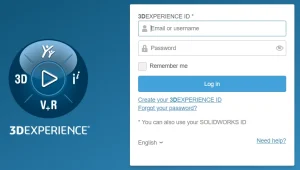
图2:在3ds.com创建账户
安装 ABAQUS 学生版的步骤
You can easily obtain the Abaqus student edition download by following the provided instructions for a seamless installation process. Abaqus download
请按照以下步骤操作:
- 前往 Abaqus Simulia 学习版 page and click “Free Download.”
- 如果您已有账号,请注册或登录。.
- Accept the Terms of Service Agreement and click “Download Now.” You’ll then be directed to the Download Center.
- In the Download Center, select the “Download & Instructions” dropdown menu and download the ABAQUS version you require. Extract the downloaded “.zip” file and enter the folder. If you are installing ABAQUS SE 2019, 如果您无法轻松地通过文本了解安装步骤,我们在本文第 11 节的视频中向您展示了 Abaqus 的安装步骤。.
- Run “setup.exe” to complete the installation. You can use the default ABAQUS directory settings or specify a different folder.
- 安装完成后,即可开始使用 ABAQUS。.
以下是各部分的详细步骤说明。下图来自 Windows 10 系统下安装的 SIMULIA Abaqus 学生版 2017。.
步骤1
使用 7-Zip 将下载的媒体 .zip 文件解压缩到您选择的文件夹/目录中。.
注意:此路径长度必须少于 60 个字符;例如 C:\downloads
此下载位置与产品安装的文件夹/目录不同(安装完成后可以选择删除)。.
建议您使用免费的 7-Zip 工具(版本 4.57 或更高版本),它可以处理 zip 格式的文件。如果您还没有 7-Zip,请从以下网址下载最新版本: https://7-zip.org/.
步骤2
从解压后的媒体目录运行以下可执行文件,以验证解压后的媒体的完整性:
c:\downloads\SIMULIA_Abaqus_Student.Windows64\1\0Data\intel_a\DSYInsMediaCheck.exe
步骤3
双击解压后的介质中的 setup.exe 可执行文件,开始安装过程:
c:\downloads\SIMULIA_Abaqus_Student.Windows64\1\setup.exe
步骤4
请阅读并接受许可协议条款以继续。点击“下一步”。.
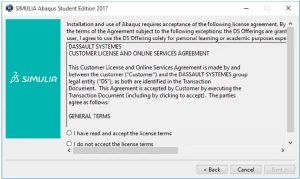
图 3:安装 Abaqus SE 的步骤 4(接受许可协议条款)
步骤5
您将被要求提供安装目录。.
注意:此位置与提取的媒体文件夹不同。.
选择安装目录,然后单击“下一步”。.
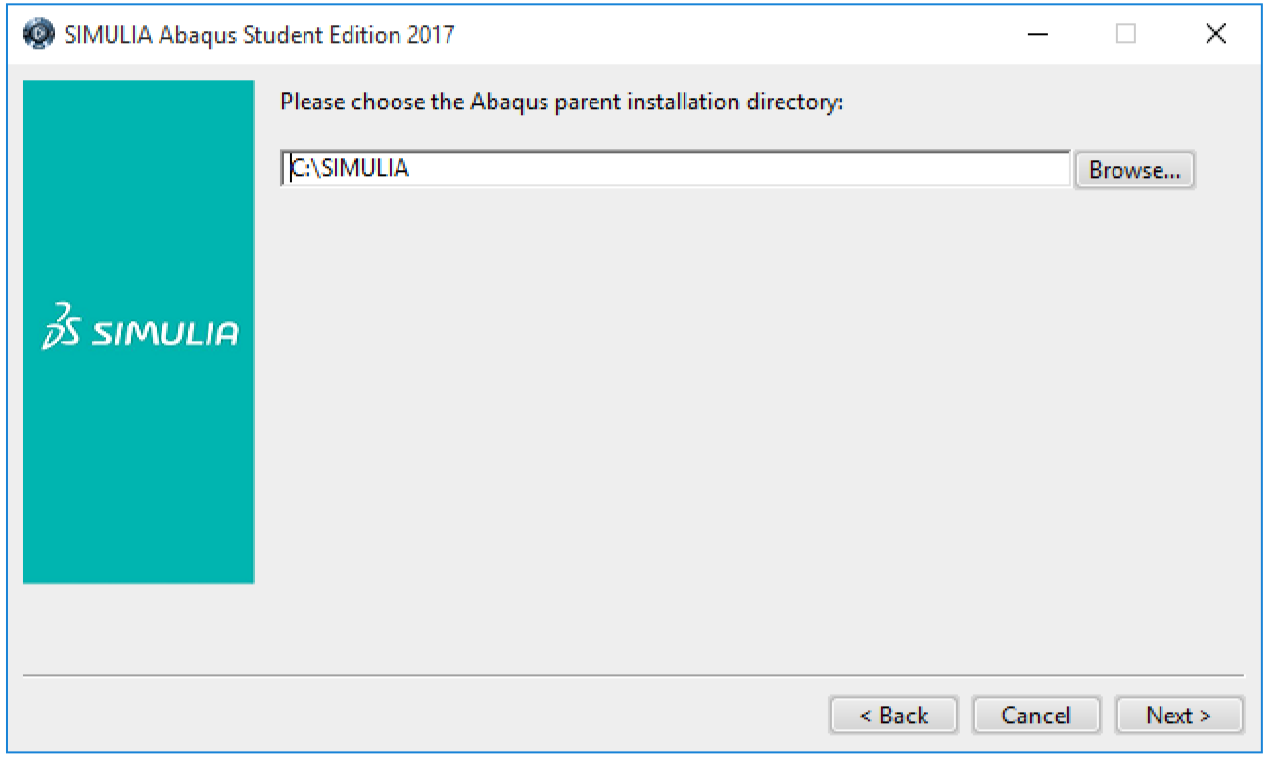
图 4:选择安装目录
步骤6
选择 Abaqus 作业文件的存放位置,然后单击“下一步”。.
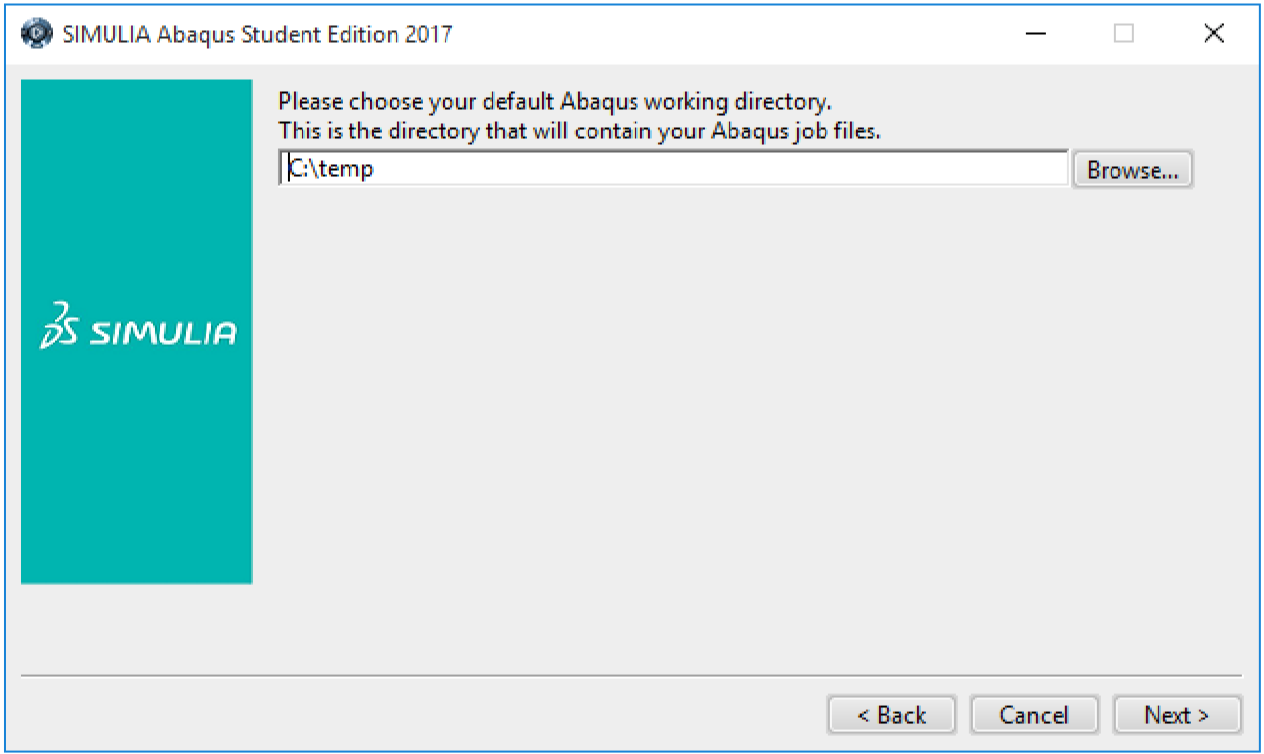
图 5:选择 Abaqus 默认工作目录
步骤7
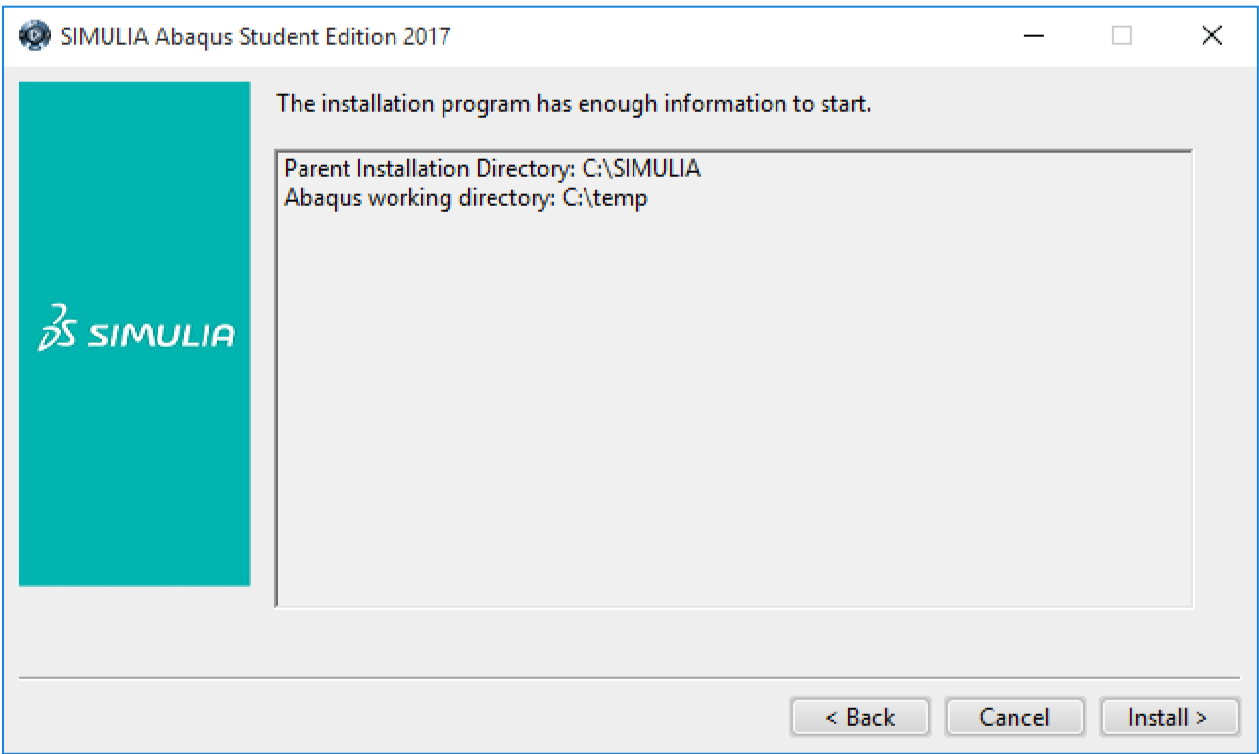
请仔细阅读安装前摘要信息。准备就绪后,点击“安装”按钮继续。.



 English
  Korean
  Chinese
一个回复
您好,感谢您撰写这篇文章,我正需要这份安装指南,请问商业版也可以用同样的方法安装吗?