
Essential Package
€ 710.0
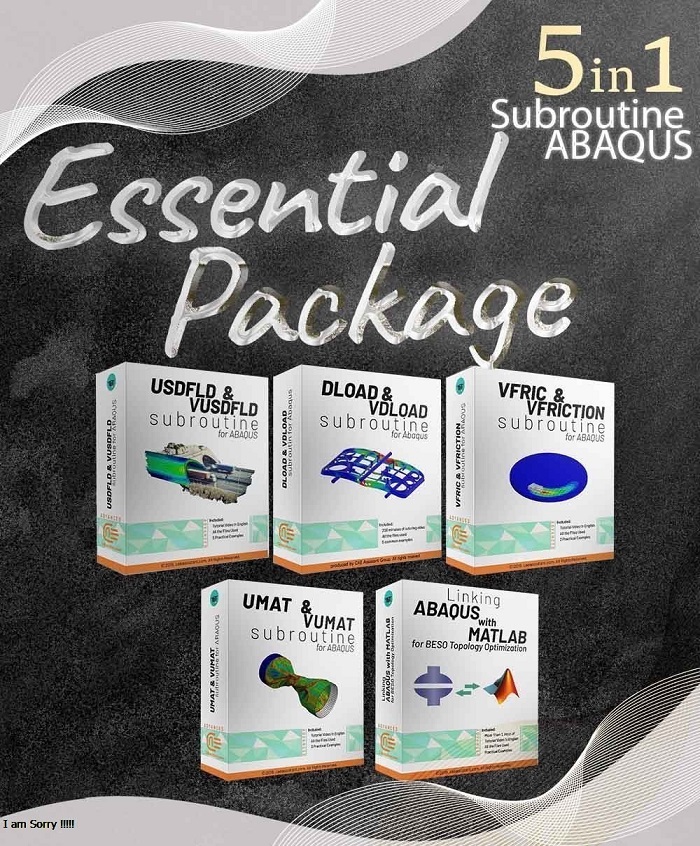
In this package, you can get comprehensive training of the following very useful four subroutines at a lower cost. In this package, more than 9 hours of practical training in the form of videos, PowerPoint, and workshops are provided.
During the years of our activities, many students and professors have received these 5 practical packages from us, and we decided to offer this popular package in the form of the “Essential Package” at a reasonable price.
We assure you that by providing this package, you will be answered to how to define the properties of complex materials or complex loads and contacts very quickly and will save you a lot of time. Because in the training workshops of these packages, there are several practical examples for using these subroutines that can make you a professional in writing them quickly.
| Package Content |
.inps,video files, Fortran files (if available), Flowchart file (if available), Python files (if available), Pdf files (if available) |
|---|---|
| Tutorial video duration |
481 minutes |
| language |
English |
| Level | |
| Package Type | |
| Software version |
Applicable to all versions |
| Subtitle |
English |
If you want to write the most basic and important subroutines in Abaqus software and answer your needs for defining the complex properties of materials, complicated types of loads, advanced types of frictional contacts, defining properties based on different variables, we suggest you the “Essential Package”.
In this package, you can get comprehensive training of the following very useful four subroutines at a lower cost. In this package, more than 9 hours of practical training in the form of videos, PowerPoint and workshops are provided.
During the years of our activities, many students and professors have received these 5 practical packages from us, and we decided to offer this popular package in the form of the “Essential Package” at a reasonable price.
We assure you that by providing this package, you will be answered to how define the properties of complex materials or complex loads and contacts very quickly and will save you a lot of time. Because in the training workshops of these packages, there are several practical examples for using these subroutines that can make you a professional in writing them quickly.
Advanced Package 1- UMAT Subroutine (VUMAT Subroutine) introduction: 4 workshops in 160 min English Video
This package is used when the material model is not available in ABAQUS software. If you follow this tutorial package, including standard and explicit solver, you will have the ability to write, debug and verify your subroutine based on customized material to use this in complex structures. These lectures are introduction to write advanced UMAT and VUMAT subroutines in hyperelastic Martials, Composites, and Metal, and so on.
Advanced Package 2- Introduction to VFRICTION and VFRIC Subroutines in ABAQUS: 4 Workshops in 120 min English Video
This tutorial helps you in cases where the classical Columbian equations are more complex and cannot be implemented by the graphical ABAQUS environment. This package introduces and teaches how to write these two subroutines. This introduction contains explaining different optional and mandatory parameters of VFRICTION and VFRIC subroutines.
Advanced Package 3- DLOAD Subroutine and VDLOAD Subroutine in ABAQUS: 5 Workshops in 120 min English Video
This training package helps Abaqus users to prepare complex DLoad and VDLoad subroutines. With the help of these workshops, you can get acquainted with the basic and comprehensive way of DLoad and VLoad subroutine writing and their applications. By viewing this package as an engineer, you can do basic projects with complex loads.
Advanced Package 4- Introduction to USDFLD and VUSDFLD Subroutine: 4 Workshops in 120 min English Video
In this usable tutorial, the material properties can change to an arbitrary dependent variable. One of the most important advantages of this subroutine is simplicity and applicable. Various and high usage examples are unique characteristics of the training package.
Advanced Package 5- Linking ABAQUS and MATLAB: 60 min English Video
This package presents a technique to bridge the gap between ABAQUS and MATLAB. It is especially useful when you want to set up an automated optimization loop between these two PC applications. The key points for linking are presented in a case study that is about topology optimization of an end-fixed 2D plate by the BESO approach.
All the package includes Quality assurance of training packages. According to this guarantee, you will be given another package if you are not satisfied with the training, or your money is returned. Get more information in terms and conditions of the CAE Assistant.
All packages include lifelong support, 24/7 support, and updates will always be sent to you when the package is updated with a one-time purchase. Get more information in terms and conditions of the CAE Assistant.
Notice: If you have any question or problem you can contact us.
Ways to contact us: WhatsApp/Online Support/Support@CAEassistant.com/ contact form.
Projects: Need help with your project? You can get free consultation from us here.
To access tutorial video run the .exe file on your personal pc and send the generated code to shop@caeassistat.com and wait for your personal code, which is usable only for that pc, up to 24 hours from CAE Assistant support.
Here you can see the purchase process of packages: Track Order










10 reviews for Essential Package
Clear filtersYou must be logged in to post a review.
 English
  Korean
  Chinese
franck locas –
You may find thousands of videos on youtube but they lack complete description and consistency. In this package, you will learn everything you want to know. It should be mentioned, all software files and documents are also available in this package and it helps me to check all details.
elia gruber –
I am very grateful to the CAE assistant team and the group of authors on the course for interesting lectures and excellent notes! Great course for Abaqus users!
Experts Of CAE Assistant Group –
Thanks for your kind review
james –
Thanks for this great offer! The English subtitle and all workshops’ files; all you can ask from a tutorial package. Do you recommend another package that has the same quality as this package?
Experts Of CAE Assistant Group –
Sure.
See full package lists:
paul.corbin –
It looks like a good deal! Why didn’t you put UEL subroutine instead of VFRIC?
Experts Of CAE Assistant Group –
You can find the UEL package separately in the following links:
https://caeassistant.com/product/introduction-to-uel-subroutine-in-abaqus/
Pablo.Ruiz –
If it is essential, why there is no sign of python package here? I think it would have been better for you to put the python package as well.
Experts Of CAE Assistant Group –
You can find the python package separately in the following links:
https://caeassistant.com/product/python-scripting-in-abaqus-part1/
https://caeassistant.com/product/python-scripting-in-abaqus-part-2/
Wú.Luó –
! I recommend this package. It contains examples’s files and English subtitle.