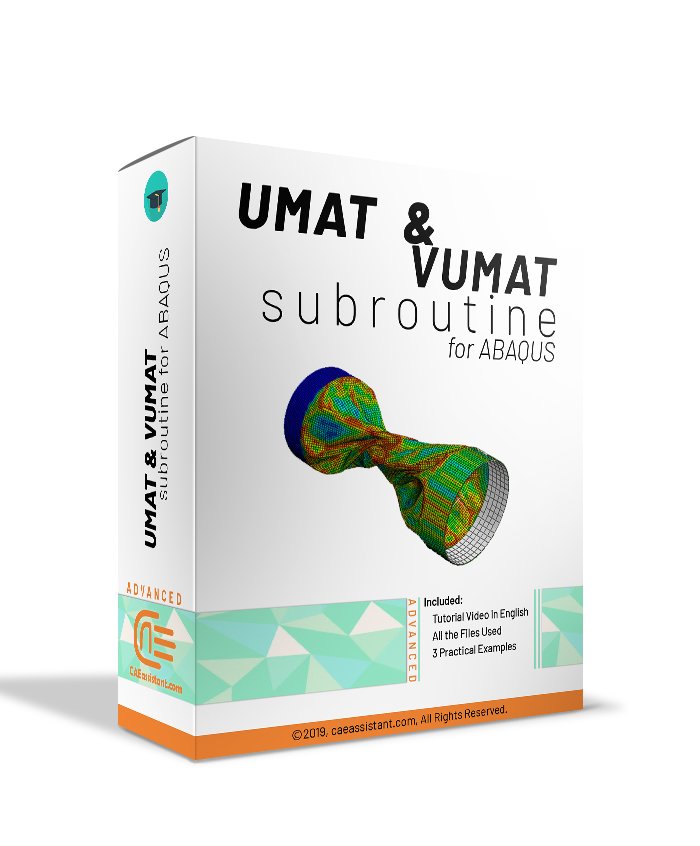
UMAT Subroutine (VUMAT Subroutine) introduction

This package is usable when the material model is not available in ABAQUS software. If you follow this tutorial package, including standard and explicit solver, you will have the ability to write, debug and verify your subroutine based on customized material to use this in complex structures. These lectures are an introduction to write advanced UMAT and VUMAT subroutines in hyperelastic Martials, Composites and Metal and so on.

Watch Demo
UMAT subroutine | Learn UMAT Abaqus | Umat Abaqus course
What You'll Learn

Buy Together & Save

This Course Includes

Course Content

UMAT Subroutine (VUMAT Subroutine) introduction

Product Informations

[woodmart_video video_type=”youtube” video_youtube_url=”https://www.youtube.com/watch?v=96sfwnvLHkA” video_size=”aspect_ratio” video_aspect_ratio=”eyJkZXZpY2VzIjp7ImRlc2t0b3AiOnsidmFsdWUiOiIxNi85In19fQ==” woodmart_css_id=”68d7eb1bd4faa” responsive_spacing=”eyJwYXJhbV90eXBlIjoid29vZG1hcnRfcmVzcG9uc2l2ZV9zcGFjaW5nIiwic2VsZWN0b3JfaWQiOiI2OGQ3ZWIxYmQ0ZmFhIiwic2hvcnRjb2RlIjoid29vZG1hcnRfdmlkZW8iLCJkYXRhIjp7InRhYmxldCI6e30sIm1vYmlsZSI6e319fQ==” video_autoplay=”no” video_mute=”no” video_loop=”no” video_controls=”yes”]

Tutorial Package Demo

In this video, you’ll learn how to use UMAT and VUMAT subroutines in Abaqus from the basics.

If you follow this tutorial package, including standard and explicit solver, you will have the ability to write, debug and verify your subroutine based on customized material to use this in complex structures.

The package includes over two hours of video content, high-quality materials, and four practical examples to help you understand and apply these subroutines effectively.

Introduction to UMAT Subroutine (VUMAT)

During the process of solving each problem, ABAQUS uses a specific program to relate the strain to the stress (the material model). So, If we can not use the material model in  ABAQUS/CAE,  the user should write the subroutine format known to ABAQUS as UMAT subroutine (in standard solver) or VUMAT subroutine (in explicit solver). Learn UMAT Abaqus subroutine with complete and best-quality lectures in this video training package, and if you want to buy UMAT Abaqus course, you are in the right place.

In fact, this subroutine is used to define complex or unusual and novel material models that are not available by default in ABAQUS.

Indeed, this tutorial package contains basic principles and concepts along with practical examples to learn UMAT Abaqus. In other words, the ultimate goal of this tutorial is to give the user the ability to write UMAT subroutine and VUMAT subroutine to define the mechanical behavior of materials and introduce them to the ABAQUS software. See full information about what you are learning in the drop down menu on the right side of this page.

You can find a demo of this package on our channel on YouTube.

Moreover, the general description of how to write a subroutine is available in the article titled Start Writing a Subroutine in Abaqus: Basics and Recommendations “. You may also like this article to begin writing your own UMAT: Start Writing Your First UMAT in Abaqus

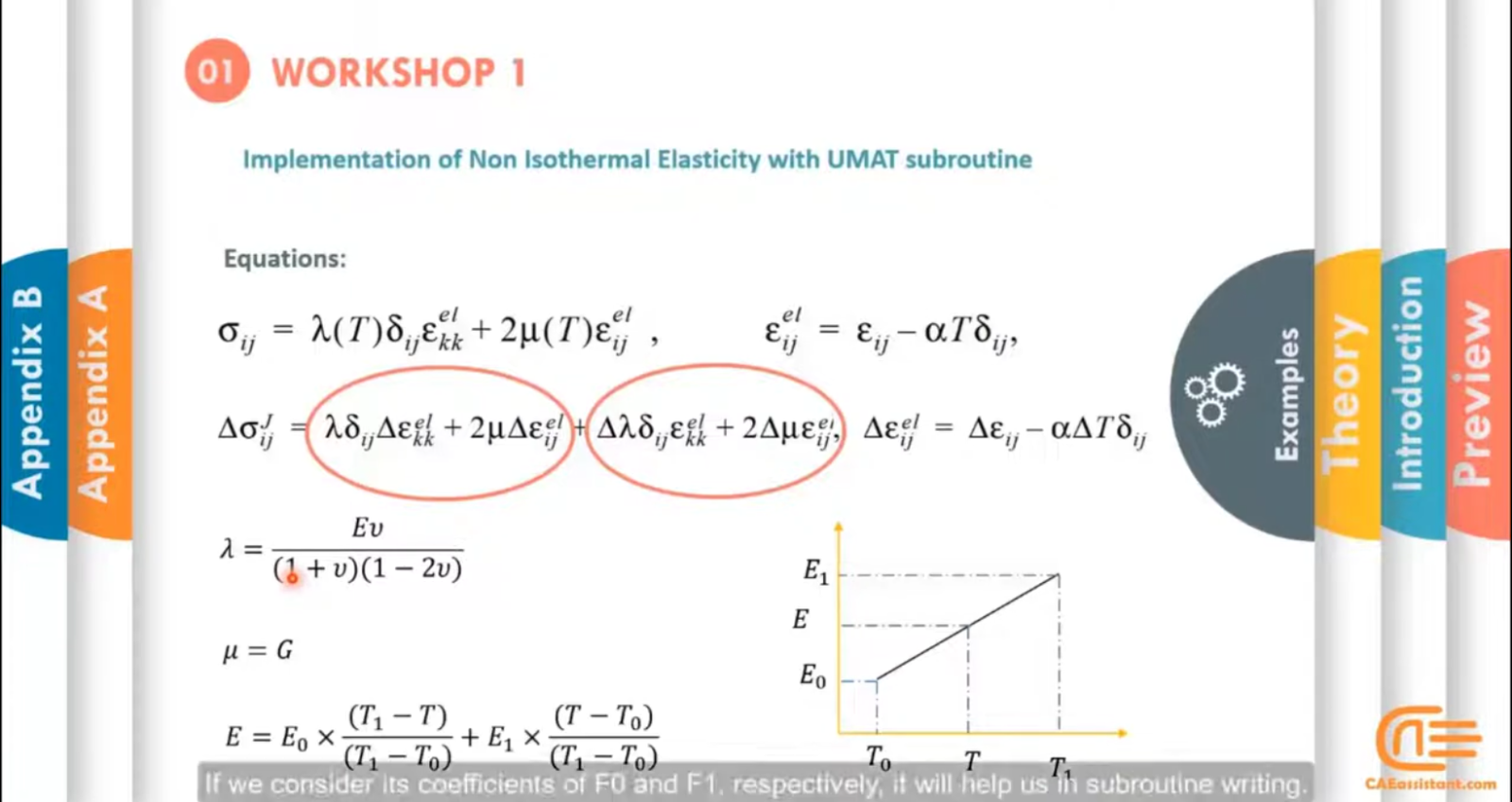
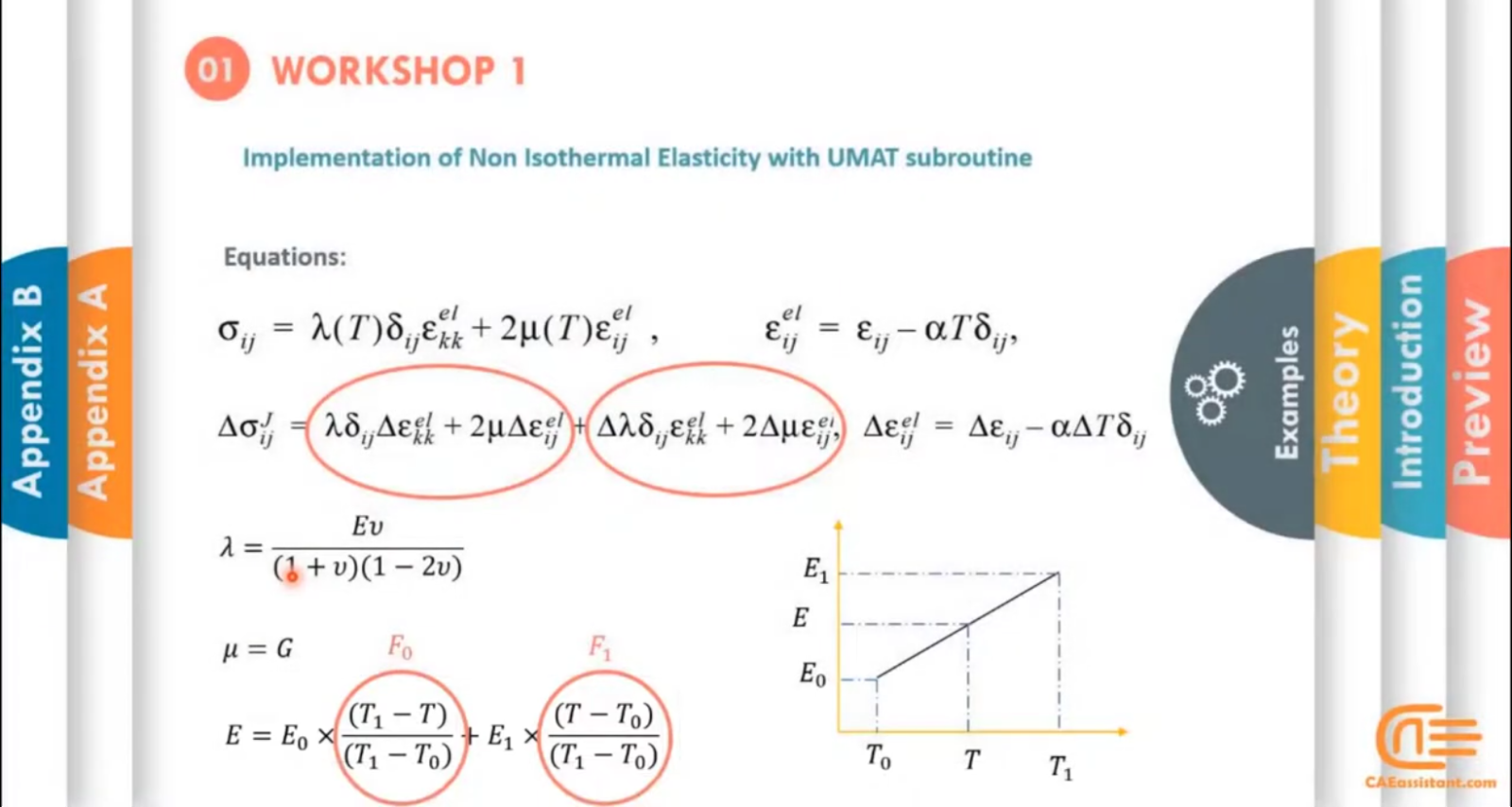
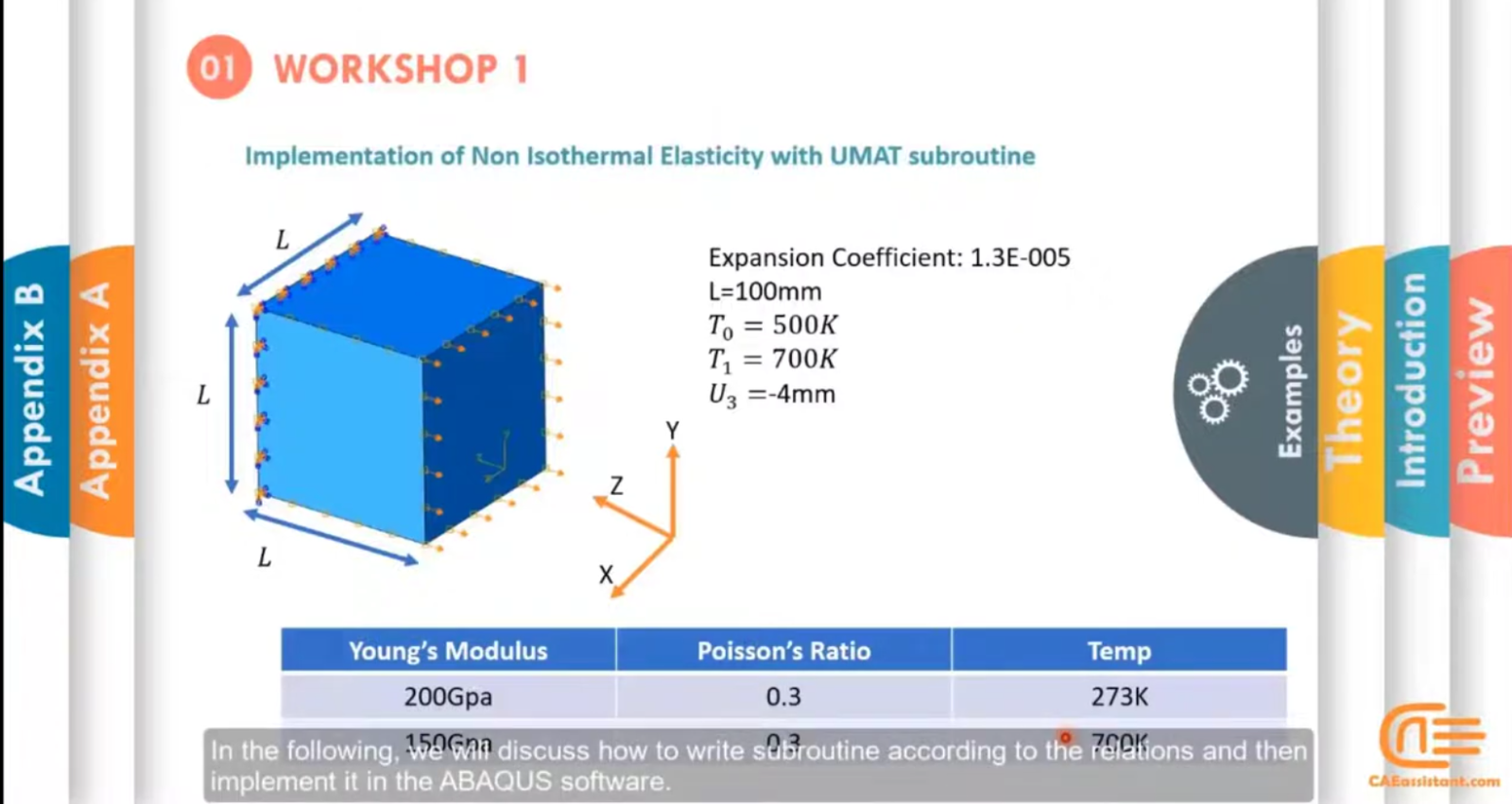
Workshop 1: Writing UMAT Subroutine for Isotropic Isothermal Elasticity

Firstly, in the first workshop, the behavior of the material is an isotropic linear elastic. Firstly, structural equations are fully explained. After that, the lecturer writes the UMAT subroutine and compares the results obtained from the subroutine with the results without the use of the subroutine. See full information about this workshop and what you learn in the drop-down menu on the right side of this page. You can learn UMAT Abaqus by checking this Umat Abaqus course syllables.

Workshop 2: Writing UMAT Subroutine for Elasticity and TSAI failure criterion of composite material

Subsequently, the elastic behavior of orthotropic materials is described in the second workshop. After that, the lecturer writes the UMAT subroutine for the elastic behavior of these materials along with the failure initiation of composite materials and verifies the results obtained from the graphical environment of ABAQUS software. See full information about this workshop and what you learn in the drop-down menu on the right side of this page.

Workshop 3: Writing VUMAT Subroutine for Brittle Materials + Element Removal

Thirdly, the elasticity behavior of isotropic material is simulated for brittle materials along with element removal in the third workshop. In other words, the difference between this workshop and the first workshop is using the VUMAT subroutine, considering the failure criterion, and setting the element removal. See full information about this workshop of the Umat Abaqus course and what you learn in the drop-down menu on the right side of this page.

Workshop 4: Writing VUMAT Subroutine for Isotropic Hardening Plasticity

Finally, a complex example is examined. To clarify, In this simulation, computational plasticity equations are used. That is to say; the lecturer simulates the elastic behavior along with the plastic behavior of the material is also simulated. In conclusion, stress, internal energy, and dissipative energy are the output of the VUMAT subroutine based on isotropic hardening plasticity. See full information about this workshop and what you learn in the drop-down menu on the right side of this page.

If you want to buy UMAT Abaqus course, you can contact our experts on the live chat on the left side of this page.

Abaqus CAE is a powerful software tool used for both pre-processing and post-processing in finite element analysis, essential for modeling, analyzing, and visualizing complex mechanical systems. For those looking to master Abaqus CAE and leverage its full potential, our website offers comprehensive tutorial packages tailored to both beginners and advanced users.

The Abaqus user subroutine allows the program to be customized for particular applications unavailable through the main Abaqus facilities. You should write a user subroutine if you could not run your analysis by ABAQUS built-in models for materials, loads, properties, elements, etc., for example, if you need to model a user-defined nonlinear stress-strain relation, which is not provided by Abaqus, then look for UMAT user subroutine. A more advanced subroutine is UEL, which allows the creation of user-defined elements. If it is your first time writing a subroutine like UMAT, please read the Start Writing an Abaqus Subroutine: Basics & Recommendations article. After reading this post and watching this tutorial’s demo video, you will definitely decide to save time in Abaqus modelling and get this UMAT training package. If you have questions, ask here on our live chat on the left side of this page.

What does the UMAT Abaqus do?

Obviously, the philosophy behind the UMAT Abaqus subroutine is that the material model developer should be concerned only with the development of the material model and not the development and maintenance of the FE model.

Referring to the article How to start writing a subroutine (Section 3), you can see we use a UMAT in the stress calculation step.

So, the main output of a UMAT subroutine is the stress tensor. In the process, Abaqus must also define the (consistent) Jacobian to continue its incremental scheme. Generally, to write a newly developed UMAT, you should follow these steps:

1. Knowing well the material model theory for our UMAT Abaqus

2. Getting Familiar with UMAT Abaqus parameters (Inputs/Outputs)

3. Developing FORTRAN code of the UMAT in Abaqus

4. Implementation in Abaqus & Compilation

5. Testing and debugging UMAT subroutine

6. Examining UMAT results and verification

read more: ddsdde abaqus umat

[woodmart_list icon_library=”openiconic” woodmart_css_id=”5dfa8e3e0668e” list=”%5B%7B%22list-content%22%3A%22What%20do%20we%20learn%20from%20this%20package%3F%22%7D%2C%7B%22list-content%22%3A%22Teaching%20plan%20and%20Prerequisites%20and%20Next%20steps%20%22%7D%2C%7B%22list-content%22%3A%22Package%20specification%22%7D%5D” icon_openiconic=”vc-oi vc-oi-play” icons_color=”eyJwYXJhbV90eXBlIjoid29vZG1hcnRfY29sb3JwaWNrZXIiLCJjc3NfYXJncyI6eyJjb2xvciI6WyIgLmxpc3QtaWNvbiJdfSwic2VsZWN0b3JfaWQiOiI1ZGZhOGUzZTA2NjhlIiwiZGF0YSI6eyJkZXNrdG9wIjoiI2Y1ODYzNCJ9fQ==”]

You can watch demo here.

[woodmart_popup shape=”round” width=”800″ woodmart_css_id=”5def77c20eda5″ title=”Watch Video” full_width=”no” button_inline=”no”]
[/woodmart_popup]
[woodmart_list icon_library=”openiconic” woodmart_css_id=”6059cee4683e0″ list=”%5B%7B%22list-content%22%3A%22When%20do%20you%20need%20to%20use%3F%22%7D%2C%7B%22list-content%22%3A%22How%20to%20use%20UMAT%20and%20VUMAT%20Subroutines%3F%22%7D%2C%7B%22list-content%22%3A%22What%20is%20the%20Difference%20between%20material%20subroutines%20like%20USDFLD(VUSDFLD)%2C%20UHARD(VUHARD)%2C%20UHYPER%2C%20and%20UMAT(VUMAT)%3F%22%7D%2C%7B%22list-content%22%3A%22What%20is%20the%20difference%20between%20UMAT%20and%20VUMAT%20Subroutines%3F%22%7D%2C%7B%22list-content%22%3A%22How%20to%20convert%20UMAT%20to%20VUMAT%20and%20vice%20versa%3F%20%22%7D%2C%7B%22list-content%22%3A%22What%20are%20the%20Complete%20theories%20about%20hook%E2%80%99s%20law%20and%20implementation%20in%20the%20subroutine%3F%22%7D%2C%7B%22list-content%22%3A%22What%20is%20the%20flowchart%20of%20writing%20different%20UMAT%20and%20VUMAT%20subroutines%3F%22%7D%2C%7B%22list-content%22%3A%22How%20does%20ABAQUS%20solve%20the%20problem%20by%20these%20subroutines%20step%20by%20step%3F%22%7D%2C%7B%22list-content%22%3A%22What%20is%20the%20difference%20in%20the%20method%20of%20solution%20for%20ABAQUS%2Fstandard%20and%20ABAQUS%2Fexplicit%3F%22%7D%2C%7B%22list-content%22%3A%22Where%20different%20user%20subroutines%20(like%20CREEP%2C%20FRIC%2C%20UEL%2C%20UEXPAN%2C%20UGENS%2C%20USDFLD%2C%20UMAT%2C%20DLOAD%2C%20FILM%2C%20HETVAL%2C%20UWAVE%20and%20etc.)%20fit%20into%20Abaqus%20in%20solving%20the%20problem%3F%22%7D%2C%7B%22list-content%22%3A%22How%20to%20calculate%20the%20jacobian%20matrix%20in%20UMAT%3F%22%7D%2C%7B%22list-content%22%3A%22How%20to%20familiar%20with%20different%20types%20of%20equations%2C%20applications%2C%20and%20how%20they%20are%20derived%20for%20elastic%20material%20like%20isotropic%2C%20orthotropic%2C%20anisotropic%20in%20different%20types%20of%20elements%20like%20a%20shell%2C%20plane%20stress%2C%20plane%20strain%2C%20and%20continuum%20elements%3F%22%7D%5D” icon_openiconic=”vc-oi vc-oi-play” icons_color=”eyJwYXJhbV90eXBlIjoid29vZG1hcnRfY29sb3JwaWNrZXIiLCJjc3NfYXJncyI6eyJjb2xvciI6WyIgLmxpc3QtaWNvbiJdfSwic2VsZWN0b3JfaWQiOiI2MDU5Y2VlNDY4M2UwIiwiZGF0YSI6eyJkZXNrdG9wIjoiI2Y1ODYzNCJ9fQ==”]
[woodmart_list icon_library=”openiconic” woodmart_css_id=”6059cf1be030f” list=”%5B%7B%22list-content%22%3A%22How%20to%20familiar%20with%20different%20variables%20in%20UMAT%20subroutine%20(DDSDDE%2C%20STRESS%2C%20STATEV%2C%20SSE%2C%20SPD%2C%20SCD%20and%20etc.)%20and%20how%20to%20calculate%20and%20differences%20between%20them%20(mandatory%20and%20alternative)%3F%5Cn%20%20%3Cspan%20style%3D%5C%22float%3A%20right%3B%5C%22%3E%3C%2Fspan%3E%5Cn%5Cn%22%7D%2C%7B%22list-content%22%3A%22what%20is%20the%20difference%20between%20time%20variables%20like%20DTIME%2C%20KINC%20and%2C%20etc.%3F%3Cspan%20style%3D%5C%22float%3A%20right%3B%5C%22%3E%3C%2Fspan%3E%5Cn%5Cn%22%7D%2C%7B%22list-content%22%3A%22Which%20articles%20could%20help%20to%20write%20subroutines%3F%20%3Cspan%20style%3D%5C%22float%3A%20right%3B%5C%22%3E%3C%2Fspan%3E%22%7D%2C%7B%22list-content%22%3A%22How%20to%20write%20the%20subroutine%20line%20by%20line%3F%20%3Cspan%20style%3D%5C%22float%3A%20right%3B%5C%22%3E%3C%2Fspan%3E%22%7D%2C%7B%22list-content%22%3A%22How%20to%20add%20subroutines%20inputs%20and%20setting%20to%20use%20the%20subroutine%20in%20GUI%20of%20Abaqus%3F%20%3Cspan%20style%3D%5C%22float%3A%20right%3B%5C%22%3E%3C%2Fspan%3E%22%7D%2C%7B%22list-content%22%3A%22How%20to%20Simulate%20the%20problem%20in%20beam%20model%20with%20Abaqus%20and%20subroutine%20and%20compare%20with%20each%20other%20to%20verify%20the%20written%20subroutine%3F%20%3Cspan%20style%3D%5C%22float%3A%20right%3B%5C%22%3E%3C%2Fspan%3E%22%7D%5D” icon_openiconic=”vc-oi vc-oi-ok” icons_color=”eyJwYXJhbV90eXBlIjoid29vZG1hcnRfY29sb3JwaWNrZXIiLCJjc3NfYXJncyI6eyJjb2xvciI6WyIgLmxpc3QtaWNvbiJdfSwic2VsZWN0b3JfaWQiOiI2MDU5Y2YxYmUwMzBmIiwiZGF0YSI6eyJkZXNrdG9wIjoiI2Y1ODYzNCJ9fQ==” css=”.vc_custom_1616498618386{padding-left: 5px !important;}”]
[woodmart_list icon_library=”openiconic” woodmart_css_id=”6059cfbdc4cc3″ list=”%5B%7B%22list-content%22%3A%22What%20is%20the%20stiffness%20matrix%20of%20orthotropic%20elasticity%3F%20%3Cspan%20style%3D%5C%22float%3A%20right%3B%5C%22%3E%3C%2Fspan%3E%5Cn%22%7D%2C%7B%22list-content%22%3A%22What%20is%20the%20TSAI-HILL%20failure%20criterion%20equation%3F%20%3Cspan%20style%3D%5C%22float%3A%20right%3B%5C%22%3E%3C%2Fspan%3E%22%7D%2C%7B%22list-content%22%3A%22How%20to%20calculate%20other%20mechanical%20properties%20of%20orthotropic%20material%20by%20other%20inputs%3F%3Cspan%20style%3D%5C%22float%3A%20right%3B%5C%22%3E%3C%2Fspan%3E%22%7D%2C%7B%22list-content%22%3A%22How%20to%20write%20the%20subroutine%20line%20by%20line%3F%20%3Cspan%20style%3D%5C%22float%3A%20right%3B%5C%22%3E%3C%2Fspan%3E%22%7D%2C%7B%22list-content%22%3A%22How%20to%20Simulate%20the%20problem%20in%20shell%20plate%20model%20with%20the%20Abaqus%20material%20model%20and%20subroutine%20material%20model%20and%20compare%20with%20each%20other%20to%20verify%20the%20written%20subroutine%3F%3Cspan%20style%3D%5C%22float%3A%20right%3B%5C%22%3E%3C%2Fspan%3E%22%7D%5D” icon_openiconic=”vc-oi vc-oi-ok” icons_color=”eyJwYXJhbV90eXBlIjoid29vZG1hcnRfY29sb3JwaWNrZXIiLCJjc3NfYXJncyI6eyJjb2xvciI6WyIgLmxpc3QtaWNvbiJdfSwic2VsZWN0b3JfaWQiOiI2MDU5Y2ZiZGM0Y2MzIiwiZGF0YSI6eyJkZXNrdG9wIjoiI2Y1ODYzNCJ9fQ==” css=”.vc_custom_1616498643581{padding-left: 5px !important;}”]
[woodmart_list icon_library=”openiconic” woodmart_css_id=”6059cff480552″ list=”%5B%7B%22list-content%22%3A%22How%20to%20familiar%20with%20different%20variables%20in%20VUMAT%20subroutine%20(STRESSNEW%2CnewSTATEV%2CSSE%2CSPD%2CSCD%20and%20etc.)%20and%20how%20to%20calculate%20and%20differences(mandatory%20and%20alternative)%5Cn%3Cspan%20style%3D%5C%22float%3A%20right%3B%5C%22%3E%3C%2Fspan%3E%5Cn%5Cn%22%7D%2C%7B%22list-content%22%3A%22How%20to%20find%20complete%20information%20about%20every%20variable%20in%20these%20two%20types%20of%20subroutines%3F%3Cspan%20style%3D%5C%22float%3A%20right%3B%5C%22%3E%3C%2Fspan%3E%22%7D%2C%7B%22list-content%22%3A%22What%20is%20the%20difference%20between%20stress%20tensor%20in%20UMAT%20and%20VUMAT%3F%3Cspan%20style%3D%5C%22float%3A%20right%3B%5C%22%3E%3C%2Fspan%3E%22%7D%2C%7B%22list-content%22%3A%22What%20is%20the%20setting%20to%20remove%20element%20in%20GUI%20and%20the%20subroutine%20in%20VUMAT%20subroutine%3F%3Cspan%20style%3D%5C%22float%3A%20right%3B%5C%22%3E%3C%2Fspan%3E%22%7D%2C%7B%22list-content%22%3A%22How%20to%20write%20the%20subroutine%20line%20by%20line%3F%3Cspan%20style%3D%5C%22float%3A%20right%3B%5C%22%3E%3C%2Fspan%3E%22%7D%2C%7B%22list-content%22%3A%22What%20is%20the%20setting%20to%20remove%20the%20elements%20in%20GUI%20and%20the%20subroutine%20in%20VUMAT%20subroutine%3F%3Cspan%20style%3D%5C%22float%3A%20right%3B%5C%22%3E%3C%2Fspan%3E%22%7D%2C%7B%22list-content%22%3A%22Simulate%20the%20problem%20in%20solid%20with%20hole%20model%20with%20Abaqus%20material%20model%20and%20subroutine%20material%20model%20and%20compare%20with%20each%20other%20to%20verify%20the%20written%20subroutine.%3Cspan%20style%3D%5C%22float%3A%20right%3B%5C%22%3E%3C%2Fspan%3E%22%7D%5D” icon_openiconic=”vc-oi vc-oi-ok” icons_color=”eyJwYXJhbV90eXBlIjoid29vZG1hcnRfY29sb3JwaWNrZXIiLCJjc3NfYXJncyI6eyJjb2xvciI6WyIgLmxpc3QtaWNvbiJdfSwic2VsZWN0b3JfaWQiOiI2MDU5Y2ZmNDgwNTUyIiwiZGF0YSI6eyJkZXNrdG9wIjoiI2Y1ODYzNCJ9fQ==” css=”.vc_custom_1616498714940{padding-left: 5px !important;}”]
[woodmart_list icon_library=”openiconic” woodmart_css_id=”6059d01d2440a” list=”%5B%7B%22list-content%22%3A%22what%20is%20the%20equation%20of%20yield%20function%2C%20equivalent%20plastic%20strain%2C%20and%20other%20variables%20which%20have%20been%20used%20in%20the%20subroutine%3F%20%20%3Cspan%20style%3D%5C%22float%3A%20right%3B%5C%22%3E%3C%2Fspan%3E%5Cn%22%7D%2C%7B%22list-content%22%3A%22How%20to%20find%20the%20complete%20book%20or%20references%20to%20write%20the%20subroutine%20in%20computational%20plasticity%20filed%3F%3Cspan%20style%3D%5C%22float%3A%20right%3B%5C%22%3E%3C%2Fspan%3E%22%7D%2C%7B%22list-content%22%3A%22what%20is%20the%20flowchart%20and%20equations%20which%20should%20have%20been%20used%20step%20by%20step%20in%20the%20subroutine%3F%3Cspan%20style%3D%5C%22float%3A%20right%3B%5C%22%3E%3C%2Fspan%3E%22%7D%2C%7B%22list-content%22%3A%22what%20is%20the%20internal%20energy%20and%20how%20to%20calculate%20it%3F%3Cspan%20style%3D%5C%22float%3A%20right%3B%5C%22%3E%3C%2Fspan%3E%22%7D%2C%7B%22list-content%22%3A%22What%20is%20the%20dissipated%20inelastic%20specific%20energy%20and%20how%20to%20calculate%20it%3Cspan%20style%3D%5C%22float%3A%20right%3B%5C%22%3E%3C%2Fspan%3E%22%7D%2C%7B%22list-content%22%3A%22How%20to%20Write%20the%20subroutine%20line%20by%20line%3F%3Cspan%20style%3D%5C%22float%3A%20right%3B%5C%22%3E%3C%2Fspan%3E%22%7D%2C%7B%22list-content%22%3A%22What%20is%20VUHARD%20subroutine%3F%3Cspan%20style%3D%5C%22float%3A%20right%3B%5C%22%3E%3C%2Fspan%3E%22%7D%2C%7B%22list-content%22%3A%22What%20is%20the%20interface%20of%20VUHARD%20subroutine%20and%20how%20to%20write%20it%3F%3Cspan%20style%3D%5C%22float%3A%20right%3B%5C%22%3E%3C%2Fspan%3E%22%7D%2C%7B%22list-content%22%3A%22How%20to%20Write%20the%20VUHARD%20subroutine%20step%20by%20step%3F%3Cspan%20style%3D%5C%22float%3A%20right%3B%5C%22%3E%3C%2Fspan%3E%22%7D%2C%7B%22list-content%22%3A%22How%20to%20simulate%20the%20problem%20in%20the%20shell%20plate%20model%20with%20the%20Abaqus%20and%20subroutine%20and%20compare%20with%20each%20other%20to%20verify%20the%20written%20subroutine.%3Cspan%20style%3D%5C%22float%3A%20right%3B%5C%22%3E%3C%2Fspan%3E%22%7D%5D” icon_openiconic=”vc-oi vc-oi-ok” icons_color=”eyJwYXJhbV90eXBlIjoid29vZG1hcnRfY29sb3JwaWNrZXIiLCJjc3NfYXJncyI6eyJjb2xvciI6WyIgLmxpc3QtaWNvbiJdfSwic2VsZWN0b3JfaWQiOiI2MDU5ZDAxZDI0NDBhIiwiZGF0YSI6eyJkZXNrdG9wIjoiI2Y1ODYzNCJ9fQ==” css=”.vc_custom_1616498763696{padding-left: 5px !important;}”]

12 reviews for UMAT Subroutine (VUMAT Subroutine) introduction

  1. Avatar of Mohamed Hassani

    Mohamed Hassani

    I’m highly satisfied to deal with CAEassistant team in connection with service and support, a really expert group offer best training product on the internet from my experience in term of advanced simulation using subroutine and python scripting. if want to success you should follow a good teacher, for this reason, I encourage student and academic researcher to get touch with them.

  2. Avatar of William Anderson

    William Anderson

    This package was able to give a good view of how to write subroutines in ABAQUS software. The advantage of this training package is complete explanations along with providing complete theories. I think the various and practical examples of this package help a lot to write my own subroutines.

  3. Avatar of Yasser Saleh

    Yasser Saleh

    Great package, it gives you a good idea about getting started with UMAT and VUMAT.

  4. Avatar of Hanane Bushnell

    Hanane Bushnell

    In my opinion, this package teaches all the necessary tips to start UMAT and VUMAT writing subroutine . However, it would be much more practical if more advanced examples were added.

  5. Avatar of Balaji Seenivasan

    Balaji Seenivasan

    This training was very much in line with what I expected. Thank you for giving complete information about writing subroutine to your customers. I also provided the advanced package and I am satisfied with both. Do you also have a consultancy service on writing subroutine for projects?

  6. Avatar of Vidul Pise

    Vidul Pise

    Thank you for your good training package. Is it possible to prepare a training package for writing subroutine in hyperelastic materials?

    • Avatar photo

      Experts of CAE Assistant Group

      It is possible. It depends on how many users request that.

Add a review

Instructors

mary mdv

 220.0

Get Free Access to More Than the Demo!